Hi. Is there a way to find a node or element by ID in mesh module? I’m getting errors during solving and would like to know where the nodes/ elements are.
you can use mesh.FindNodeClosestTo( X,Y,Z )
It would work if I knew coordinates of the node, which I don’t. I was looking through all of the settings and windows and I found what I need. For some reason it wasn’t so obvious to me:
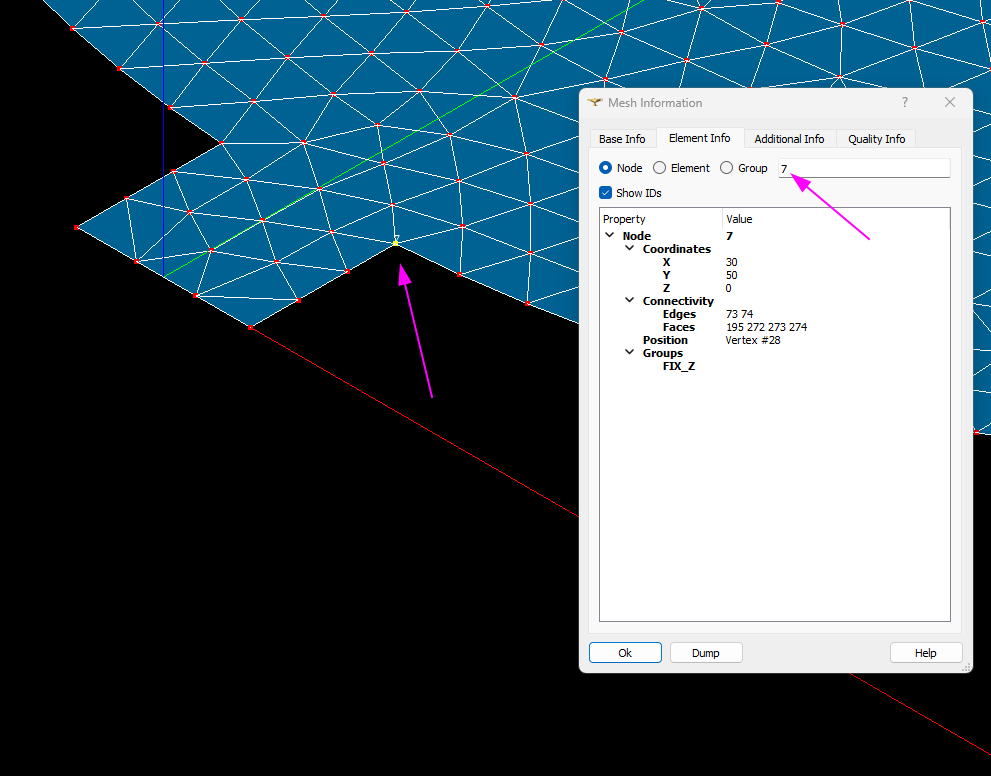
1 Like
next time try to be more specific in your question/post. you can also in the VTK viewer right click numbering/display number nodes you will see all of them.
How can I be more specific: “how to find a node by ID?”?
in python? in the interface? get to view the value? get the value in a variable?
aaaa, sorry, you’re right.
Hello,
I am trying to locate and visualize a specific element using its element ID.
My mesh contains multiple element sets.
When I enter the element ID in Mesh Information, the element is probably highlighted, but I cannot see the highlighted element in the 3D view because it is located inside another part of the mesh.
-
Is there a way to directly find and visualize an element by its ID in such cases?
-
Is there an option to select a single element and temporarily hide it to view the elements inside the mesh?
Any suggestions or recommended workflows would be greatly appreciated.
Thank you in advance!
you could make a group with that element and show only that?
1 Like
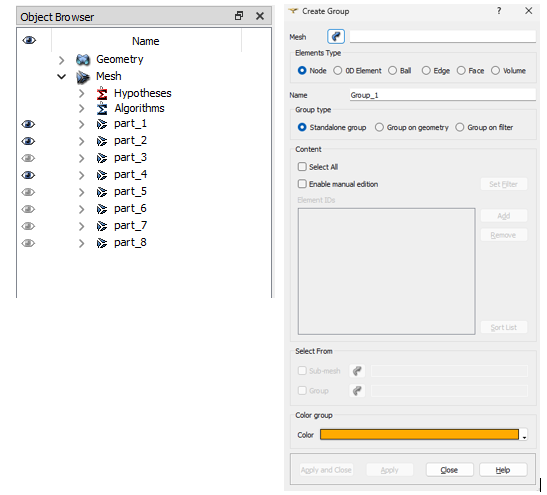
In the Create Group dialog, under the Mesh field, I am required to select a mesh part first. However, since I only know the element ID and not the corresponding part, I am not sure how to proceed.
After selecting a part, I see only two options:
-
Select All
-
Enable manual edition
There does not seem to be an option to directly add an element by its ID.
mmmmm with the python console,
something like this?
import sys

import salome

salome.salome_init()

import salome_notebook

notebook = salome_notebook.NoteBook()

sys.path.insert(0,  r'/home/franco/Desktop')

import GEOM

from salome.geom import geomBuilder

import math

import SALOMEDS

geompy = geomBuilder.New()

import  SMESH, SALOMEDS

from salome.smesh import smeshBuilder

smesh = smeshBuilder.New()

Mesh=smesh.Mesh(salome.IDToObject(salome.sg.getSelected(0)))

group=Mesh.CreateEmptyGroup( SMESH.NODE, 'groupID' ) #SMESH.NODE/SMESH.EDGE/SMESH.FACE/SMESH.VOLUME
group.Add([ID])
I added a bunch of imports that you dont need but just did not wanted to check exactly which one was necessary 
1 Like
Thank you so much for the code and your time!!
Just a few questions:
- Should I select a random part before executing the line “ Mesh=smesh.Mesh(salome.IDToObject(salome.sg.getSelected(0))) “?
- Can the ‘groupID’ be the name of the new group I intend to create?
- You need to select in the object browser the mesh where you want to see your element.
- I did not understand your question groupID is simply the name of the group you can put whatever you want.
1 Like