Hello, I am having an issue with the projection tool in geom, i am trying to project a wire (with 1 edge inside of it) to a spherical face using Operations/transform/projection.
the issue, the projection ‘goes over’ the seam of the face, and therefore the projected wire has an extra vertex (in the middle). I tried to remove this vertex by removing it using repair/fuse collinear edges within a wire but the resulting object still has the vertex.
neither of this operations have a tolerance or any parameters i can use to be able to get the desired result. any ideas/recommendations? @cbourcier I think this is kind of related with previous issues we discussed here: Issue with projection of edges with seam to create section of a face - #11 by franco.ota
here one can find the screenshot for better understanding,
white, the wire i am projecting,
red, the obtained projection with show vertex ON
grey, the spherical face
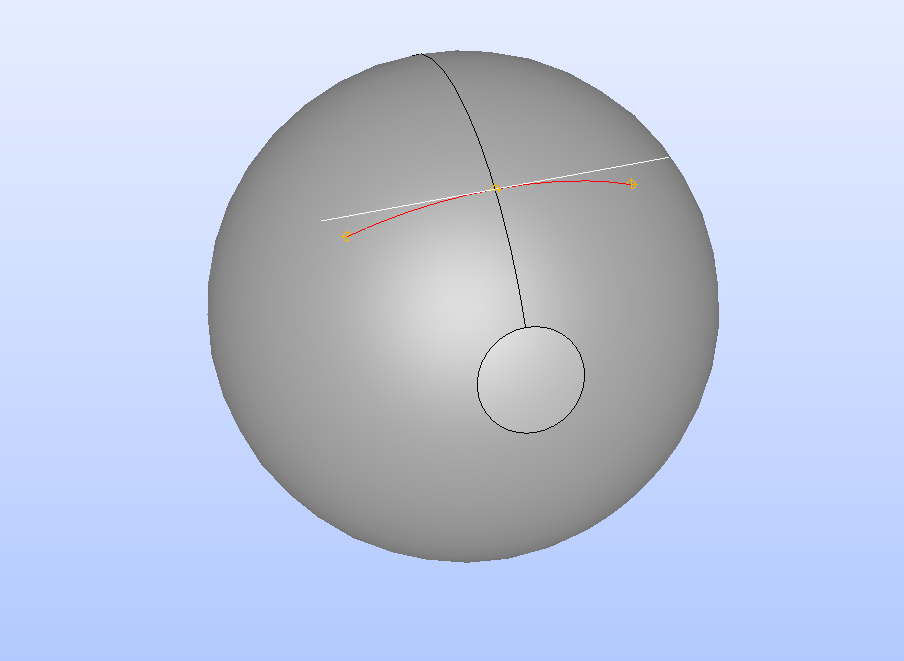
and here one can recover a tar file with the two brep geometries, the wire and the face to test.
example.tar.gz (16,4 KB)
I could do it manually by rotating the sphere or something in that like, but it may break my workflow. I also notice that if I run repair/shape processing on the projected one, this is ‘solved’ but this would be more of a patch solution instead of solving the root of it?
regards,