Is it possible to change SALOME's theme to light without affecting Windows' dark mode?

Currently, my operating system is in dark mode, and SALOME automatically follows this theme. However, I would like to use the light theme only in SALOME while keeping the rest of the system in dark mode. Is there any way to configure this specifically for SALOME?

If so, what steps would I need to take to adjust this?

1 Like

Looking for the same. In dark theme some icons and text are difficult to see

Could you please try the following steps and provide your feedback?

  • Download SALOME 9.16.0 for Windows
  • Once extracted, go to directory: SALOME-9.16.0\W64
  • keep a backup of GUI
  • go to directory: SALOME-9.16.0\W64\GUI\share\salome\resources\gui
  • copy LightApp_msg_{en,fr,ja}.qm and LightApp.xml to that directory.
  • copy LightApp.dll to SALOME-9.16.0\W64\GUI\lib\salome\LightApp.dll
  • copy SALOME_Session_Server_No_Server.exe to SALOME-9.16.0\W64\GUI\bin\salome\SALOME_Session_Server_No_Server.exe
  • Double click on run_salome.bat to launch SALOME
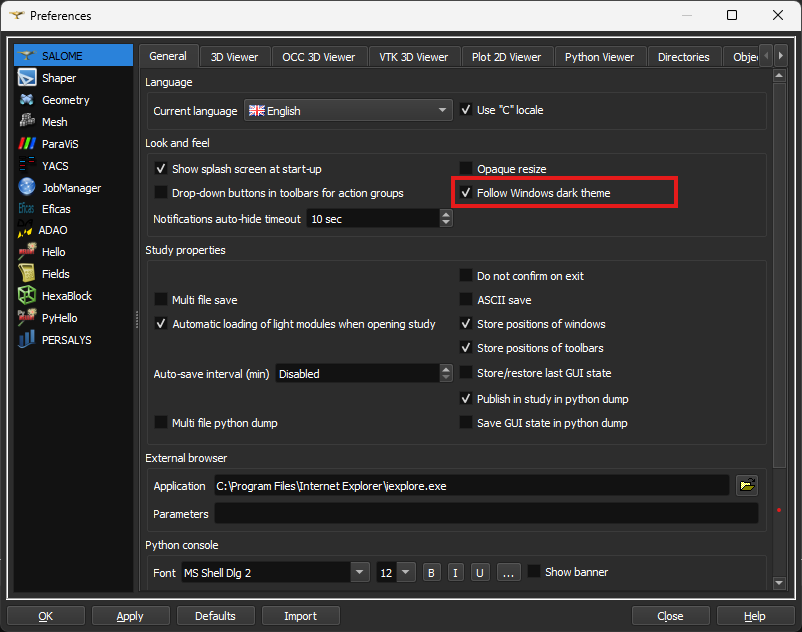
  • In the main menu, select File - Preferences
  • Tick the checkbox to apply the dark mode/ untick to not apply the dark mode to SALOME
  • restart SALOME.

I have checked that this works on my end when dark mode is enabled. SALOME can either follow the system dark mode or remain in light mode.

Please see the attached zip file, which contains all the mentioned files.

SF-1770.zip (442.4 KB)

1 Like

Tried it, and it worked perfectly.
Thank you!

1 Like