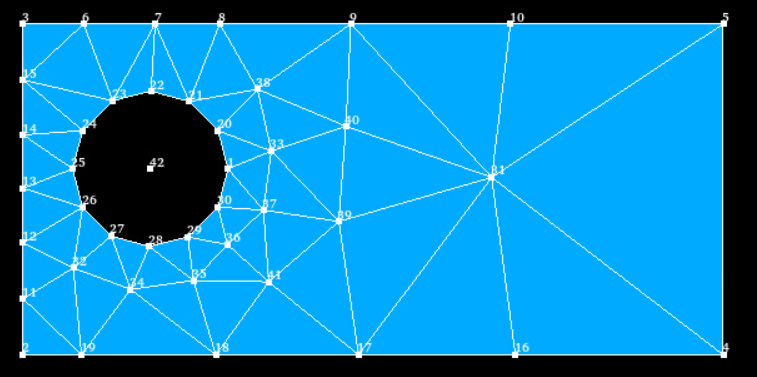
I want to make a shell mesh of a flat surface with some holes.
I wanto to delete the holes, but keep nodes on their centers.
How can I do that?
Thank you
Hello, jcsaaver.
Here is how I did something alike to what you described:
- Press ‘centre de gravité’ and select hole by hole.
- Press ‘créer une face’, option ‘face & contour’ and make a filling in each hole.
- Now you can make a ‘Union’ and a ‘Partition’ over it with the vertices you created in 1)
Hope this helps.
Hélio.
Thanks @Maggoo, but I can not find the tools you mentioned.
Is it on shaper?
Hi,
in SHAPER, you can create the point at the centre of a hole using Construction> Point. Select last mode and select the contour of the hole.
Then Build> Vertex and select it to create a result object.
Then Features> Partition to add it to your shape. Or Build> Compound will do the same if there is no need to compute intersections.
Christophe
Thank you @cbourcier. I did what you said, and though it works, I don’t know how to force the mesh to have a node in the vertex
once you create your vertex, you make a compound of your geometry and the vertex. this will add the extra node to the mesh.