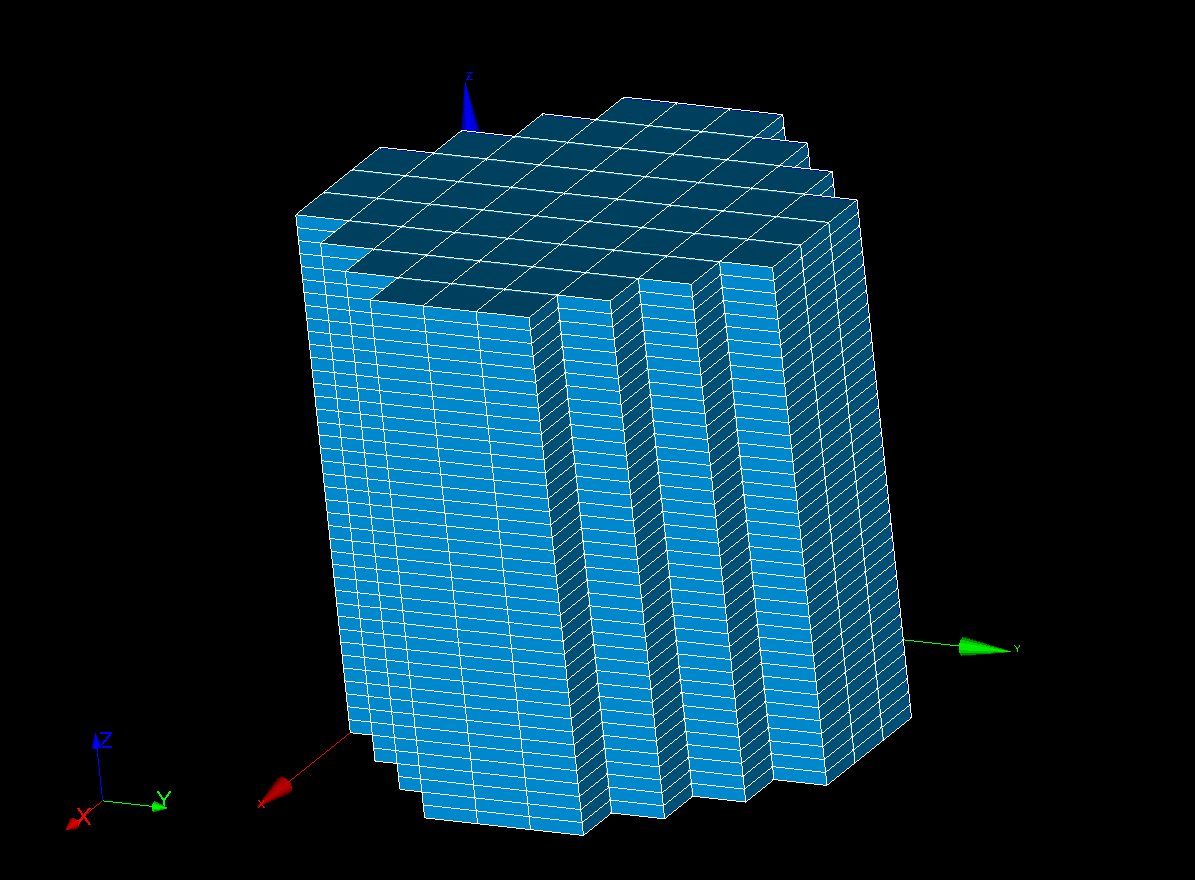
I am trying to create a 3D mesh for a geometry loaded from a xao file, which includes both the core and the reflector domains.
I would like to achieve a mesh structured exactly like the one shown in the attached screenshots:
Axial discretization only: The geometry needs to be sliced into regular horizontal layers along the Z-axis.
Uniform thickness: All axial slices must have exactly the same height.
No radial discretization: Within each layer, the cross-section of the domains should not be further subdivided radially.
I have no prior experience with this specific type of mesh in SALOME and I am not sure which algorithms or hypotheses to apply. Could someone please provide a step-by-step guide on how to set this up in the Mesh module?
sadly, i do not imagine the exact geometry you want so take things with a grain of salt. but from the text you mentionned:
you could create a 2D mesh of the cross section that then you will extrude in the Z axis and give the number of elements you want. depending on your 2D mesh, you will get hexahedrals or prims/wedges.
for achieving this, i will give you a step by step for a cylinder:
open geom
create a cylinder (new entry/primitives/cylinder)
create 1D (edges) group, for this new entry/group/create group/ (while the cylinder in the object browser is selected) and select the edges that will be in the extrusion direction (in this case the seam edge of the cylinder, so the only edge that is not circular. if it was a box you need to select the four vertical edges.) add them and create the group.
create a 2D group of one of the two faces (you can create on whichever you prefer) that will be extruded, so one of the circular faces
go to smesh and create a mesh on the cylinder, for 3D use extrusion 3D (if your geometry does not allows to be extrusion based mesh, the extrusion 3D will NOT appear), you can check the ‘requirements’ on the documentation, but basically you need that the two faces have same number of edges and vertexes, and that each vertex of the faces are connected by one edge to the other vertex of the face. for example in my example, you have two circular faces with one vertex that is connected by one edge. (the connection edges are all the edges that you should have had added in step 3). hit okey (leave the 2D and 1D empty)
select the mesh on the object browser that was created. and create a submesh. then select the 1D group and you put wire discretization and the number of elements you want, or the size (if the geometry is a real extrusion (so all the edges are same length you can get to use length size, but if there are different lengths then you should use number of elements) hit ok
create another submesh as step 6. but for the 2D group, (step 4.) there you can mesh it as you want (this might be the trickier part, if you want voxel like geometry. you can get a quad mesh or a triangular mesh. is outside of the scoop and you can find some info on the forum. anyway depending on if you have selecting a 2D-1D algorithm such as netgen 2D-1D you hit okey, or if you select a 2D algorithm, you need to go to the 1D tab and select also a 1D algorithm (as if not you dont have acknowledge to salome how it will discretize the edge of the cricle)
then you select your mesh and hit compute.
this is the workflow for what you are asking for with full control of the mesh creation which will depend on the two submeshes definition. if you want a voxel like geometry, you can also create it using body fitting algorithm and removing elements that are not hexahedrons. i dont have much experience with the later but the documentation (and some posts around here) will help you if you want to follow that path.