There are scattered English translated labels built into SALOME version 9.12.0. However, some native French persists making adoption tedious for English speakers like myself. Specifically in the AsterStudy workspace where a knowledge of the engineering terminology is difficult enough. I could not find much information on how to switch this, so I wanted to formally document what I found to be the best workaround method.
This thread was able to illustrate that checking the “Use Business-Oriented Translations” box invokes a translation file for keywords. This does not translate everything to English, but I was able to deduce from watching online tutorials there was some added English translation easter egg beyond actually setting the preferred language (which presumably does still translate other things).
The linked forum post boils down to the following process: open AsterStudy on the top bar or the dropdown. Then navigate through File>Preferences>AsterStudy>General and then find the checkbox that says “Use Business-Oriented Translations” which should change some things to English.
Once completed, the previous section invokes a translation document in the Salome codebase. The file is called global_dict.py and it’s a translation table for keywords in the GUI. It can be found in the following file path:
W64\ASTERSTUDY\lib\python3.7\site-packages\asterstudy\datamodel\global_dict.py
However, this file doesn’t seem to be built out very much. For reference, here is the translations applied after Step 1 and this file is invoked where only a few items are actually translated from French:
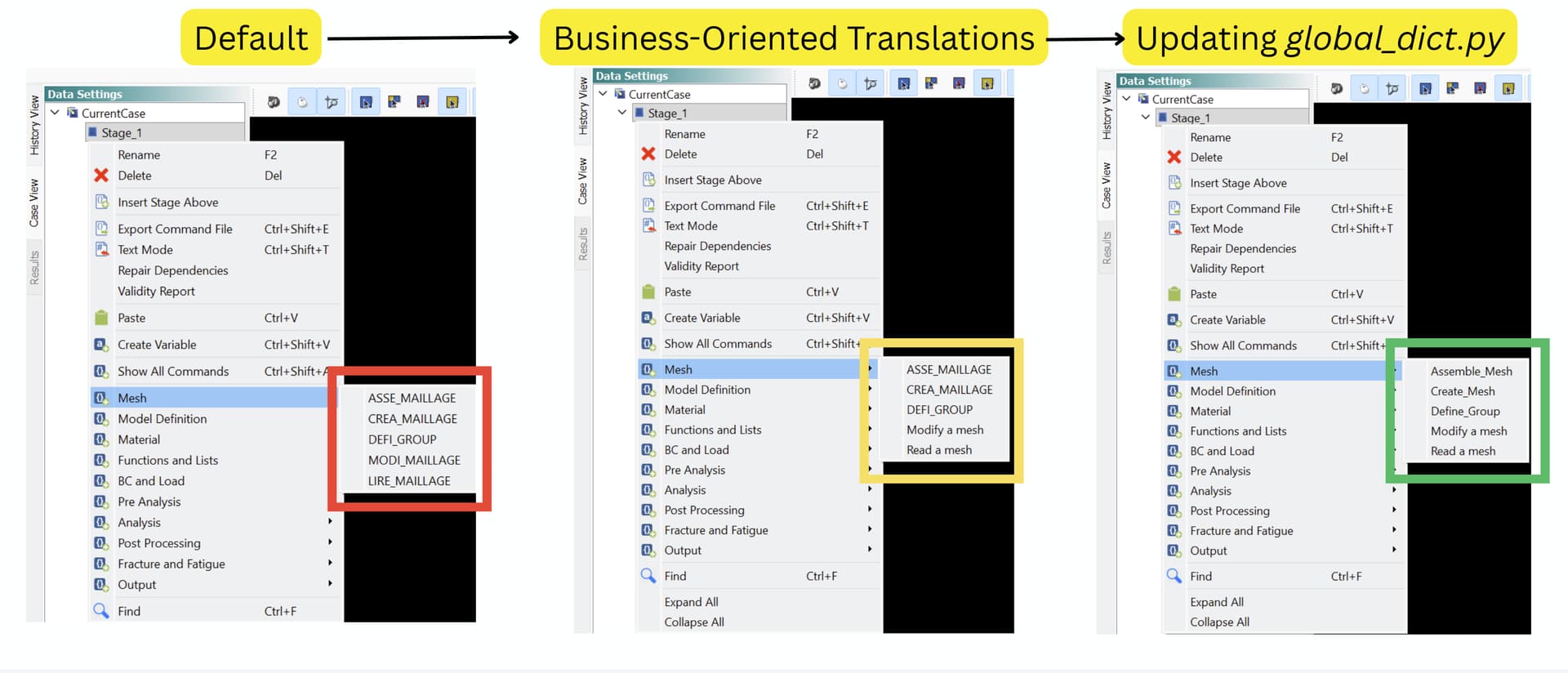
By updating the global_dict.py file, the remaining translations are applied as seen in the rightmost example from the image (I only expand out the Mesh tree in the image, but the translations apply to each item: Model Definition, Material, Analysis, etc.)
You can addon translations directly into the file using its format (which should be obvious), or the easier method is to find the file in your local SalomeMeca program folder and replace it with the file I’ve attached below. I’ve already updated many translations, and I anticipate adding onto this list as French appears. There’s really nothing more terrifying than unexpected French.
Conclusion
In summary, to get the proper translations, do the following:
- Perform Step 1 to invoke the proper file
- Find the Salome Meca program file on your computer
- Navigate to
W64\ASTERSTUDY\lib\python3.7\site-packages\asterstudy\datamodel\ - Replace the
global_dict.pyfile in that directory with the one I attached below. - Restart your program, and you should have more translations in the AsterStudy workspace


global_dict.py (6.7 KB)