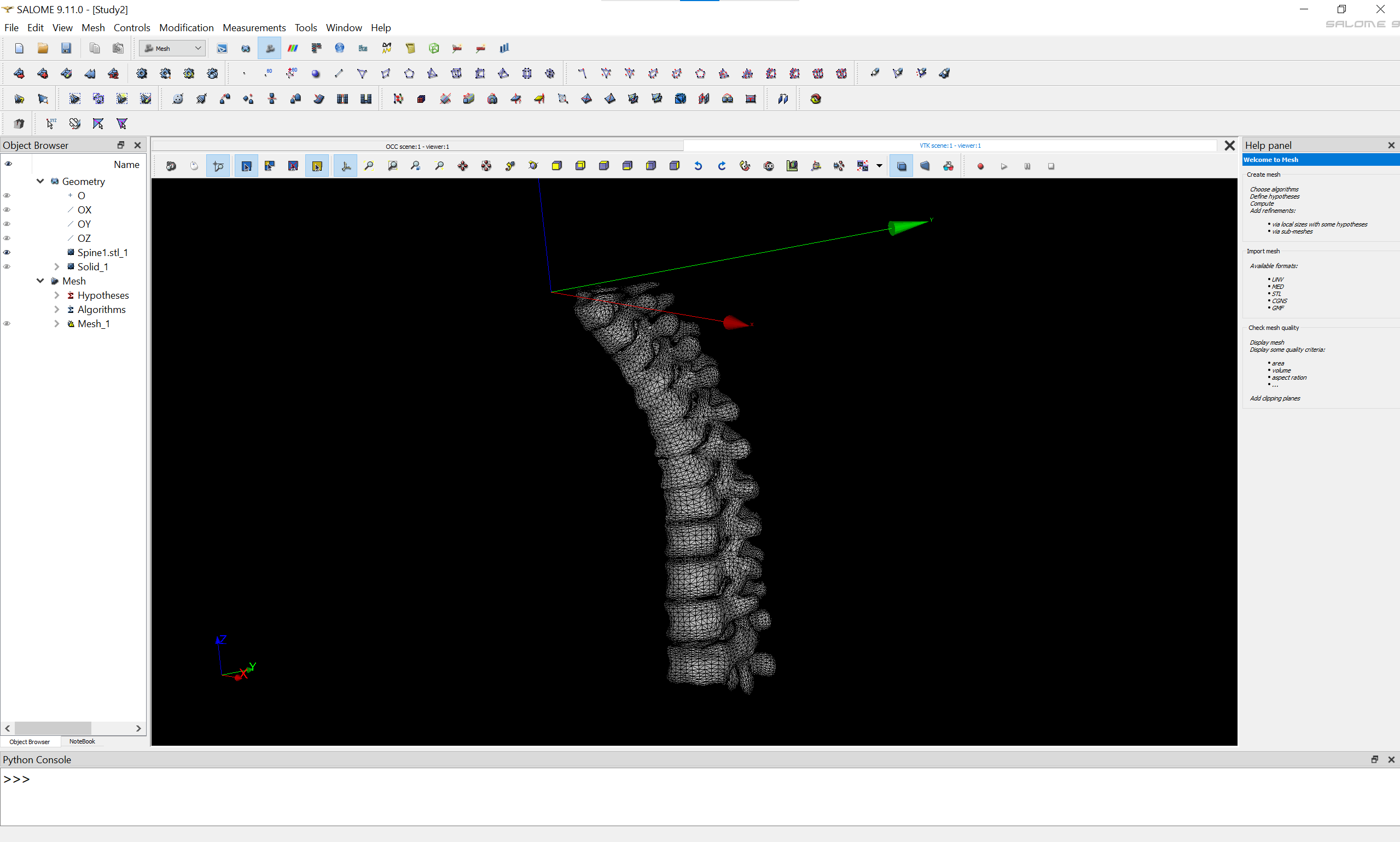
I have been attempting to mesh segmented CT data for use in Elmer, and am wondering at the best route to take. I am currently segmenting the CT data and exporting the segments to large .STL files, and then post-processing for intersections and smoothness in a mesh modelling package.
My ultimate goal is to use those surfaces as boundary surfaces against which a mesher will generate tet meshes for electrostatics simulations, but the problem I’m running into is that both GMSH and NETGEN are using the topology of the .STLs, which with the number of elements they have is destroying my available compute resources.
I’ve used OpenFOAM a bit, and the snappyHexMesh routine of generating a box mesh, and refining by snapping to .STL surfaces is more what I’m looking for.
I’ve done a literature and tutorial search for both GMSH and Salome workflows to accomplish meshing complex surfaces, and haven’t been able to find anything that shows how to mesh large, arbitrary geometries.
Does anyone have advice for a workflow that would help me generate volume meshes that conform to organic, arbitrary shapes for use in Elmer? I’ve seen some work done on expanded metal foams, so I know it has to be possible.
For Salome, I’ve tried decimating my .STLs down to the minimum acceptable resolution, importing, and generating a solid using the “Build Solid” tool. But when I try to mesh using the 1D-2D-3D NETGEN algorithm and an appropriate hypothesis, it hangs.
you can import your stl directly in SMESH. If all the faces define a closed domain, with their normals towards the outside domain, you can right-click edit mesh to mesh the volume with NETGEN 3D.
You can also coarsen or refine the faces with:
Netgen 2D (also with right-click edit mesh).
or MMGS (menu Tools> SMESH plugins> Remesh with MMG).
I have the watertight region as a single .stl file, as well as farfield, symmetry plane, and body surfaces. I’ve already tried both approaches, but unfortunately, I don’t have the original geometry/CAD files.
In this situation, is there a way to import the STL surfaces individually and directly generate a tetrahedral volume mesh from them? I was able to do this in Gmsh, but I couldn’t generate/extrude prism layers from the imported STL surfaces there.
I was able to import the STL surfaces into SMESH, but I could not find an option to generate the volume mesh directly from the imported surface STL files. Could you elaborate a bit more on the workflow you used?
From my understanding, mesh generation in SMESH usually requires an underlying geometry/solid. In my case, I only have the triangulated STL surfaces (farfield, symmetry, and body) and no CAD geometry files.
in the object browser, right-click on the mesh name, then select Edit.
in the 3D tab, select Netgen 3D. Press Apply and Close.
right-click on the mesh, then select Compute.
If your surface mesh has no holes and no self-intersecting triangles, it should work.
You can check the inside of the mesh by calling Clipping (right-click in the 3D view).
If you need to get a coarser or finer volume mesh, edit the mesh again, then in the 3D tab, add a Netgen 3D hypothesis (by clicking on the gear), and set the size you want.
I was able to generate volume from an .stl mesh that had symmetry, farfield and body combined in a single mesh following your steps. Is there a way to combine multiple .stl files and get the same result?
Also, when a single .stl file containing symmetry, farfield and body are used, I am not able to generate viscous layers as the option to choose areas to be included or avoided is not available.
a really ugly workaround this, is to import the stl in geom. this will create an shell object. one creates a solid from it and then continues to mesh this:
mesh it with the following hypothesis:
1D: wire discretization number of elements per wire==1
2D: polygon per face
3D: netgen 3D
normally this way one could use the viscouls layer algortihm over it. (it is skeatch and hacky but it should work.)
I was able to follow your steps to create the solid for meshing. But when I try to create a group from the solid, the whole thing hangs up. Any suggestions to fix that?
you could do it in a python script, when doing it on the gui it is more resource hungry and i have had salome hanging up quite often when doing things on the gui. neverhteless as i mentioned it is quite hacky way to do it so i dont promise the result.
I am importing 3 STL files: SYMM, FF, and BODY. But when I try to group them after creating a solid, how do I get all the elements’ IDs in a 1.5 million mesh? Any feature I’m missing?
I managed to get a volume mesh out of this method. But when I try to grow viscous layers, I get an error.
”Viscous layers builder: Not yet supported case: vertex bounded by 3 faces without layer at coordinates (40,0,56.6667)”
when doing the extrusion, on a already 3D mesh (with cells), the ‘extrusion layer’ is created, but but the original ones connected to the surface are not moved to the internal nodes of the extrusion layer but still connected to the exterior ones, i am missing something?
or is this the expected behavior? if so, I do not understand the use of it? outside of doing this and after the extrusion doing the netgen 3D? to fill up the remaining volume?
indeed, if you add cells with extrusion to add inner boundary cells, you’ll have to ask Netgen to mesh the remaining volume complementary to the last layer’s faces.
If you want the volume mesh to be moved when the boundary layer is added, you can try to use the tool from Code_Saturne, like shown in this video and in the documentation.