Hello,
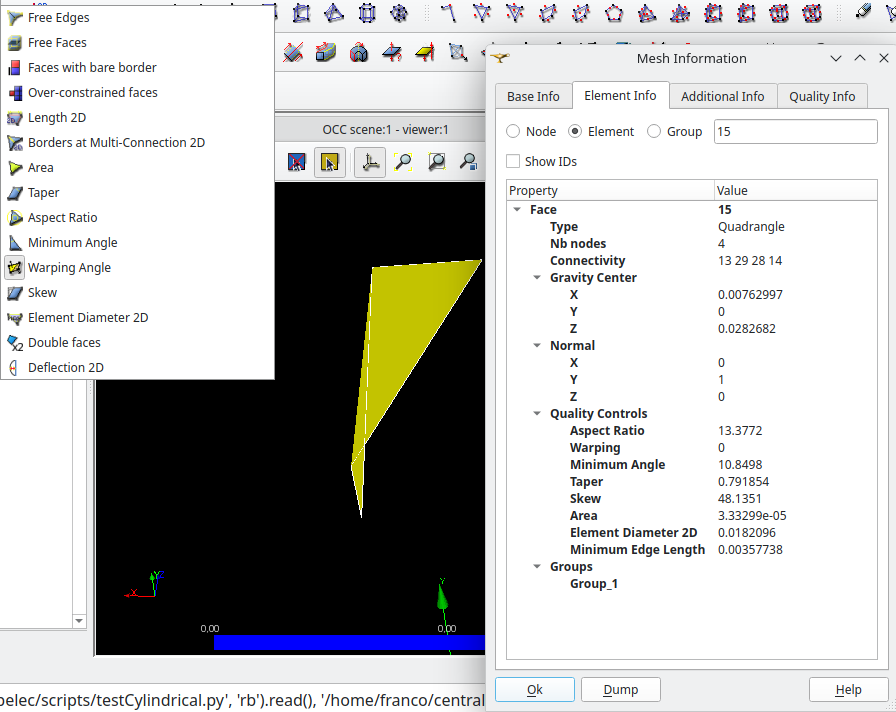
i am struggling with surface smoothing that when the elements are too large in the mesh and there is some concave sections it can completly break it and give results like the following:
which clearly is not correct. but I can not find any of the quality criteria that exists in salome be able to identify this kind of elements.
I am missing any option that will help to find this kind of elements in a mesh? or should I implement one in python which would be quite costly?
thanks in advance
Hi,
Have you tried create Group and Selection with Filter? You can hide all others and show the group later
i think you posted on the wrong post or you missunderstood me, i know how to apply filters and create groups, what i am looking/asking is what metric i could use to differentiate it… ergo what filter should i use to be able to select this kind of face
Hi Franco,
there is no such filter in SMESH yet. The function is available in MEDCOUPLING, it is called checkButterflyCells().
Find an example in test_butterfly_cells.py that allows to create a group of such faces in SMESH.
Christophe
1 Like
hello christhophe,
thanks for your answer, i want to use this for cases where smoothing breaks the mesh for concave sections, do you think the back and forth worth it? or even if exist i should code my own thing? i mean if i need to export and check all faces for each step, where what i was looking for is check specific faces.
thanks in advance
In an iterative process, you can:
- smooth the mesh
- check for butterfly-cells.
- if any butterfly cells
- get their nodes
- Either:
- smooth the initial mesh by blocking this nodes.
- or move these nodes back to their initial position.
Christophe
Thanks,
yeah is what I am currently doing but as the mesh is quite light, i was doing node by node smoothing, and as i know what faces are dependent of that node, wanted to check their quality directly, i will implemnt something from their nodes coordinates… so i can ‘go back to previous position’ before moving the other nodes.